
Manage Account
Here you can update your personal information
How to upgrade or downgrade an active membership
Step 1 – Select Upgrade
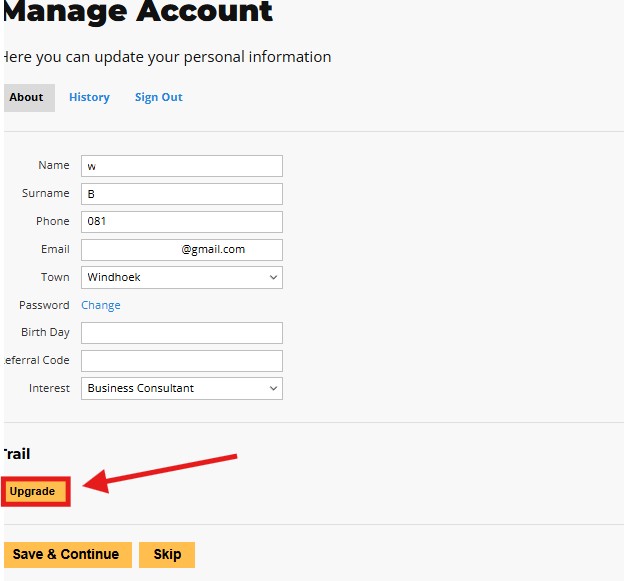
To upgrade or downgrade you can click on the “upgrade” button
Step 2 – Selecting membership
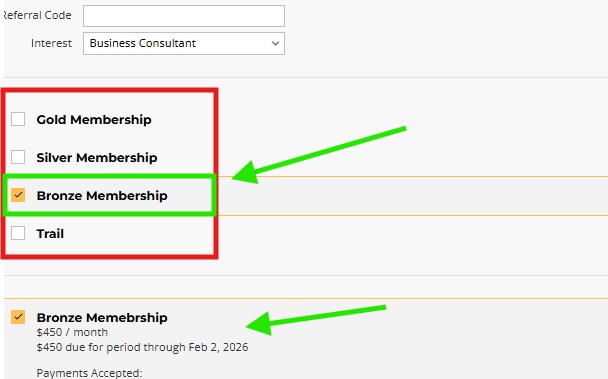
After you select your desired membership and follow the payment methods, your account will be linked and bookings can be made.
Take Note: selecting your membership opens the request for the membership; only after payment has been received will you gain access to the benefits.
Step 3 – Email Invoice & Discount codes
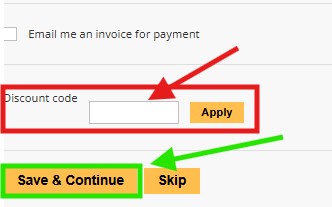
If you tick “Email me an invoice for payment,” you will receive an invoice via your registered email address.
If you have a discount code, it can be entered here, and once you are ready, you click on “Save & Continue” to save your membership upgrade. After you have clicked “Save & Continue,” the staff will receive the request email.

Pages
Company
Information
Designed by Stone Age Marketing